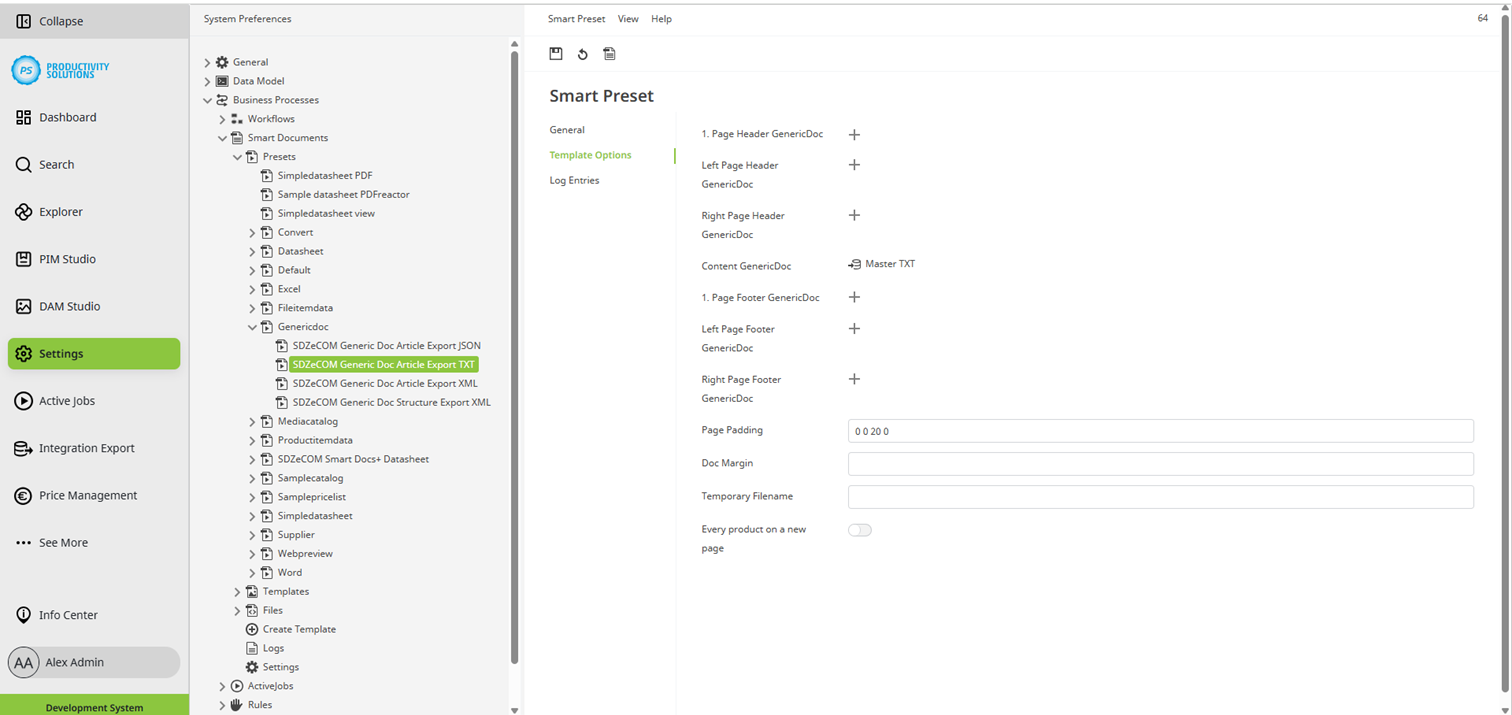
Generic Docs Configurator | Smart Doc Preset | Template Options
Field | Description |
|---|---|
| Optional for PDFs: Select the Generic Doc Template for the header on the first page. |
Left Page Header GenericDoc | Optional for PDFs: Select the Generic Doc Template for the headers on subsequent left-hand pages. |
Right Page Header GenericDoc | Optional for PDFs: Select the Generic Doc Template for the headers on subsequent right-hand pages. |
Content GenericDoc | Select the Generic Doc Template. |
| Optional for PDFs: Select the Generic Doc Template for the footer on the first page. |
Left Page Footer GenericDoc | Optional for PDFs: Select the Generic Doc Template for the footers on subsequent left-hand pages. |
Right Page Footer GenericDoc | Optional for PDFs: Select the Generic Doc Template for the footers on subsequent right-hand pages. |
Page Padding | Define the padding of the document. Format: 0 0 0 0 |
Doc Margin | Define the margin of the document. Format: 0 0 0 0 |
Temporary Filename | |
Every product on a new page | Activate this option to insert a page break before each new product. |
Alle anderen Einstellungen stimmen mit denen eines herkömmlichen Smart Docs überein und können wie gewohnt konfiguriert werde