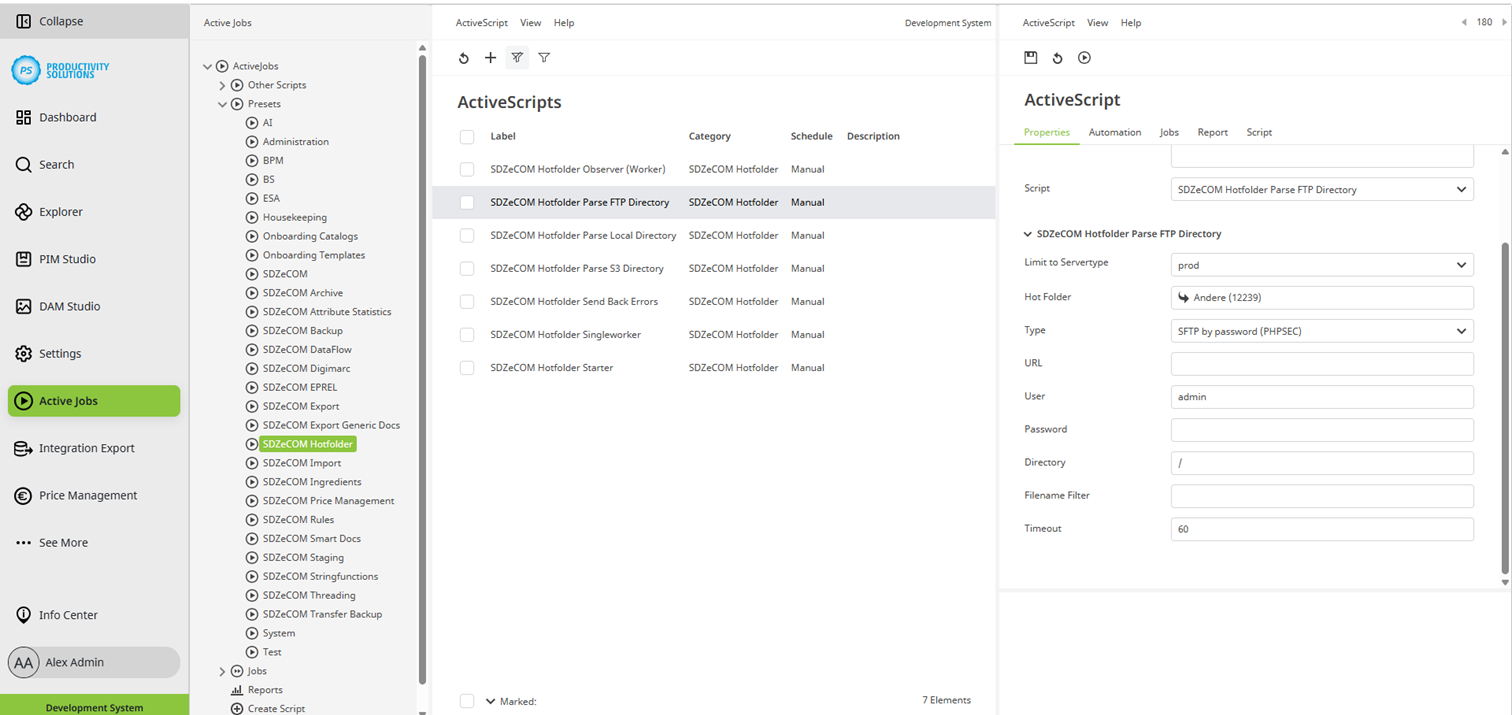
Hotfolder | Active Scripts | Types | SDZeCOM Hotfolder Parse FTP Directory
This script can be used for querying an FTP directory from which the data to be imported is to be retrieved.
Field | Description |
Designation | Name of the context |
Category | SDZeCOM Hotfolder |
Description |
|
Script | SDZeCOM Hotfolder Parse FTP Directory |
Limit to Servertype | Select the server type:
Use case: You import into a test target system and a productive target system. Create both systems as destination systems. Select the appropriate server type for each. The import context knows which system it is in: Only the respective environment is addressed from the corresponding source system. This ensures that no imports are made from a test system into the productive system when copying the system to the staging tenant. |
Hotfolder | Select the folder into which you want to import the data. |
Type | Select the FTP type:
|
URL | Enter the URL of the FTP server. |
Optional Port | Optionally, you can define a port. |
User | Enter the user name for the FTP server. |
Password | Enter the password for the FTP server. |
Directory | If required, enter a path to the source folder on the FTP server. |
Filename Filter | If a filter is entered, only files that meet the filter criteria will be imported. Only one filter criterion is possible per context. Example filters:
|
Timeout | If no connection can be established after the specified time in seconds, the import is aborted. Otherwise, the import waits and may block the system and other imports. Default: 60 |