
This posthandler sends the referenced assets to a Rest endpoint.
Available for:
Ideally, the SDZeCOM Rules+ are licensed and the “Send Referenced Assets by Rest - ruled” posthandler can be used for filling the queue based on rules.
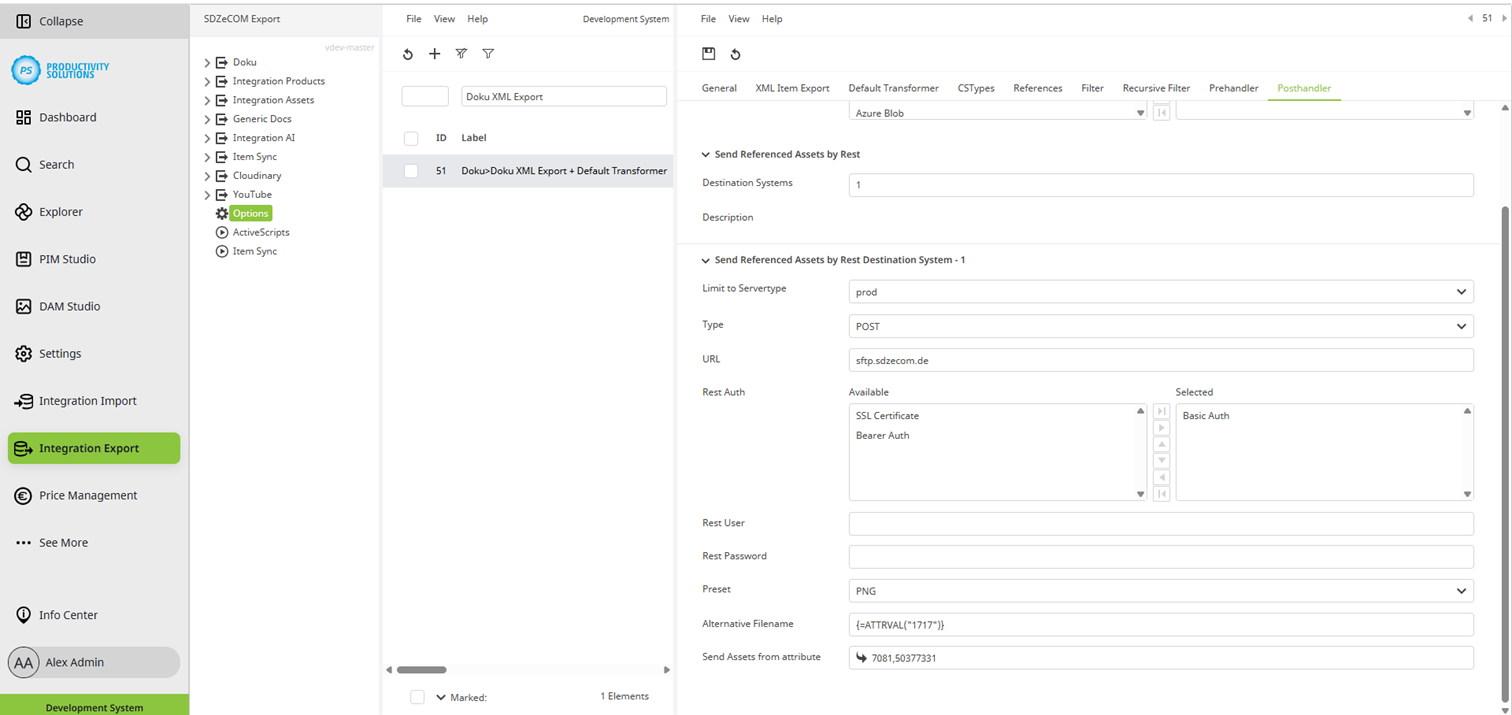
Field
|
Description
|
|
Destination Systems |
Enter the number of target systems required for this context. The fields described below are available per target system. |
|
Limit to Servertype |
Select the server type:
Use case: You export to a test target system and a productive target system. Create both systems as destination systems. Select the appropriate server type for each. The export context knows which system it is in: Only the corresponding target system is addressed from the respective environment. This ensures that no exports are made to a productive target system when copying the system to the staging tenant. |
|
URL |
Enter the Rest URL. |
|
Rest Auth |
Select the authentication method:
User: Enter the user name for the Rest endpoint.
Rest Token: Enter the token.
Certificate: Select the certificate file that you have previously stored in the DAM.
|
|
Preset |
Select the DAM preset to be used for rendering the assets. |
|
Alternative Filename |
If required, use a function, e.g. {=ATTRVAL(99999)}, to select the DAM attribute that contains the alternative file name. If the DAM attribute has a different file extension than the preset, use the function {=REPLACE(“\\.[^.\\/]+$”;‘’;{=ATTRVAL(“99999”)};TYPE_REGEX)} and add the desired extension. |
|
Send Assets from attribute |
Select the PIM reference attributes for which the preset and alternative file name are to apply. |