
Rules+ | Active Scripts | Types | SDZeCOM Rule Watch Dates
Only places new objects in the queue of rule calculation if the date criteria are met. The objects are processed directly from the database.
The Rule Result Starter is automatically started for these objects, which recalculates the rules. The starter does not need to be triggered with “Run Next.”
Example: You use processes that do not cause a check-in, but only a change (with last change date!). This means that rules are not recalculated. You now use the script to retroactively perform rule calculation for objects that were changed but not checked in within a defined period in the past (e.g., within the last 7 days).
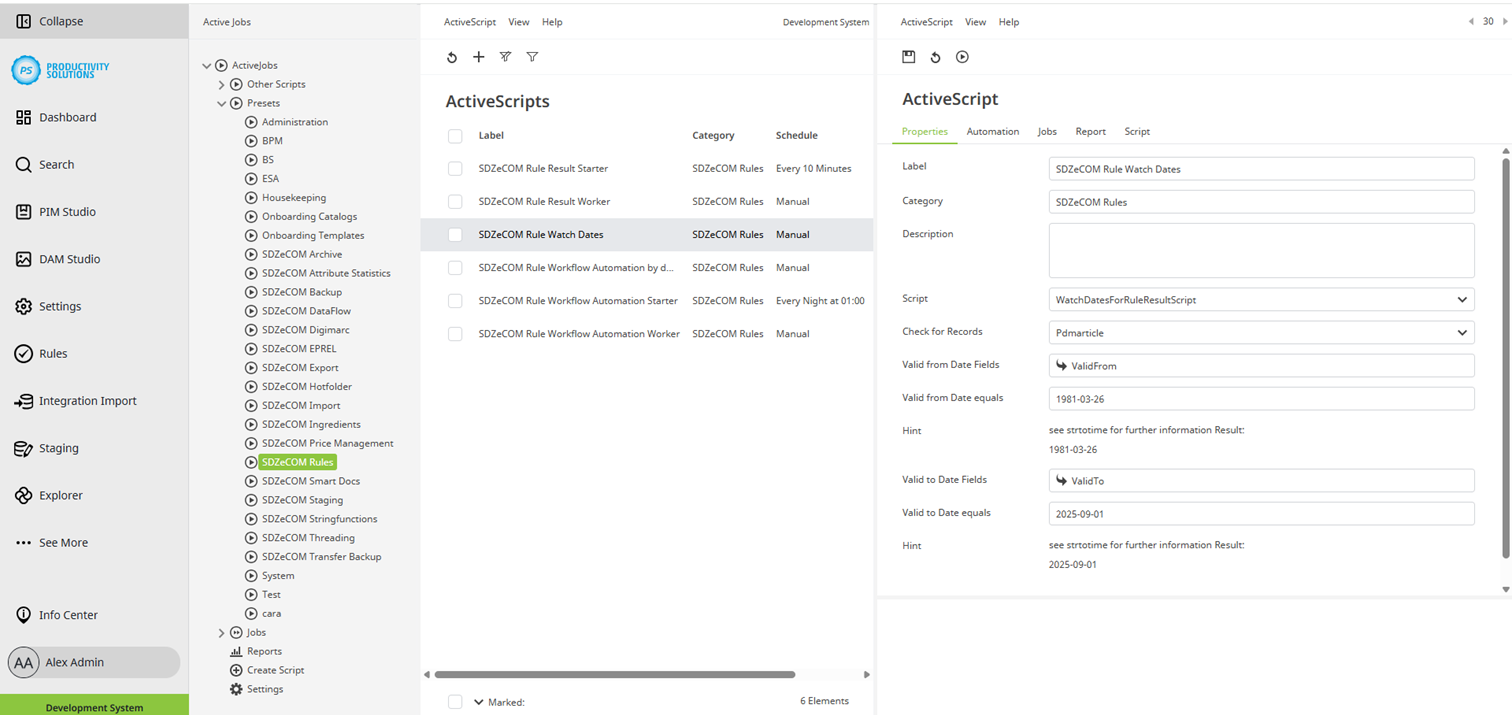
Field | Description |
Designation | Name of the context |
Category | SDZeCOM Rules If you append further text to the category name, a separate folder is generated. |
Description |
|
Script | SDZeCOM Watch Dates for Rule Result Script |
Check for Records | Select the context type, e.g., Pdmarticle for PIM object. |
Valid from Date Fields | Select the attribute that contains the start date of the validity period. |
Valid from Date equals | Define the start date in strtotime format. You can also use “-7 days,” “now,” etc. |
Valid to Date Fields | Select the attribute that contains the end date of the validity period. |
Valid to Date equals | Define the end date in strtotime format. You can also use “-7 days,” “now,” etc. |