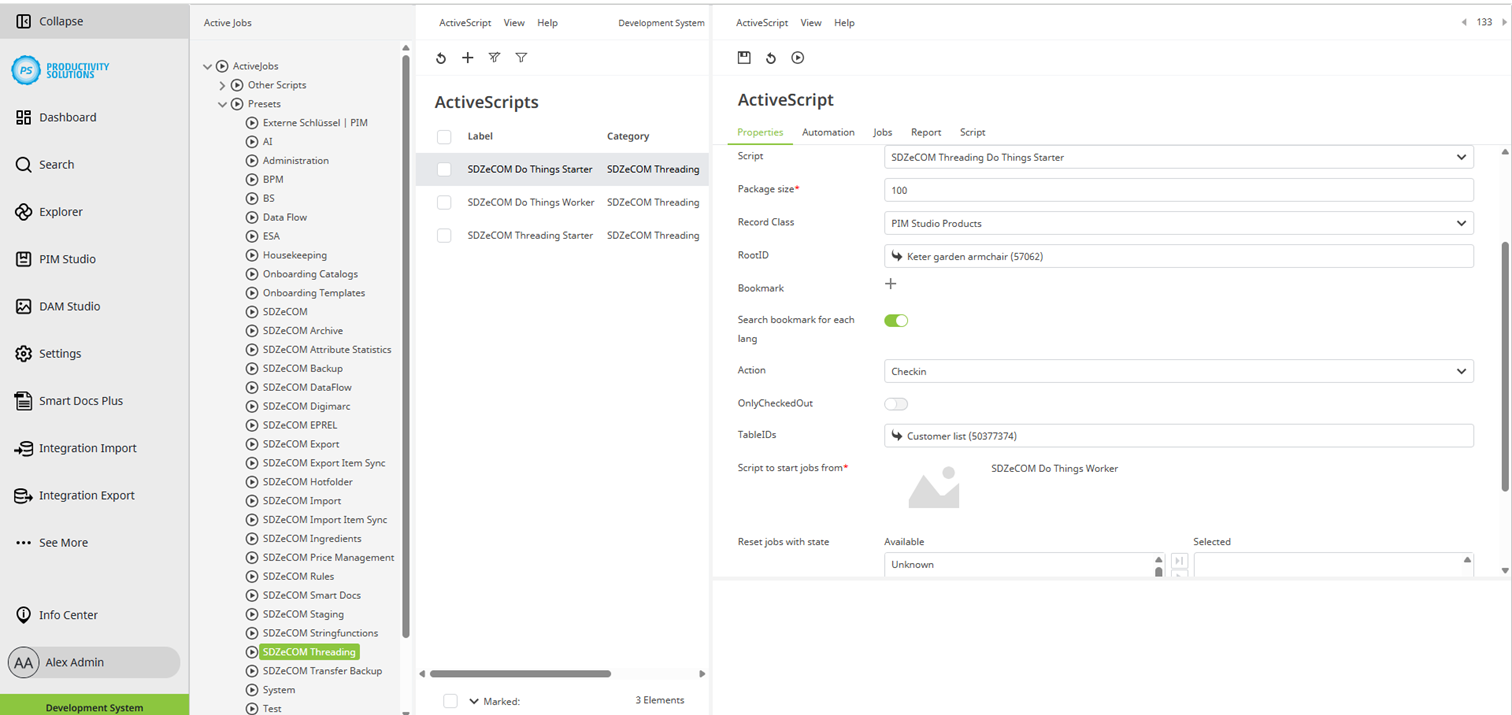
Threading | Active Scripts | SDZeCOM Threading Do Things Starter
The starter starts a context – i. e. a defined job that you have previously created.
A starter always requires a worker (see above) to process the task.
Usually, one starter and one associated worker are created for each context.
In exceptional cases, several starters can also share one worker so that system resources can be used optimally.
Field | Description |
Designation | Name of the context |
Categorie | SDZeCOM Threading If you append further text to the category name, a separate folder is generated. |
Description |
|
Script | SDZeCOM Threading Do Things Starter |
Package size | Define the maximum number of data sets to be processed. |
Context (Record Class) | The menu lists all contexts that have been created. Select the context that you want to start. |
RootID | Select the node in the tree from which the script is to be run. |
Bookmark | As an alternative to the RootID, you can select a favorite for which the script is to be run. |
Search bookmark for each lang | If you want the script to be run for a favorite: Select this option to include the favorite in all language levels. |
Action | Wählen Sie die Aktion, die ausgeführt werden soll:
For the “Delete Ruled” action, the SDZeCOM Rules+ must be licensed. |
TableIDs | If the check-in is also supposed to apply to defined tables, select them here. Table versioning must be activated for this option. Caution: This can lead to higher system utilization, and thus poorer performance. |
Script to start jobs from | Select the worker that is to process the job. |
Reset jobs with state | Data records in the selected status are reset. |