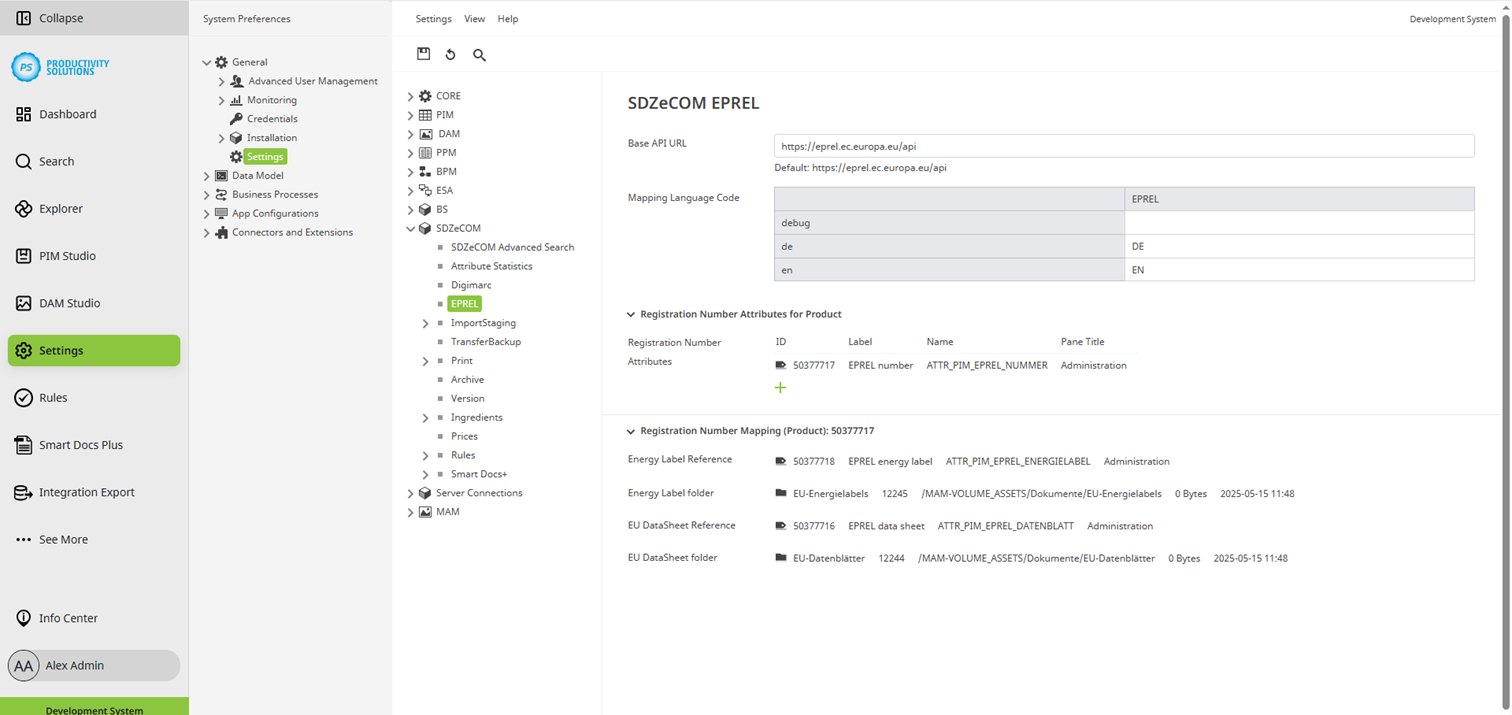
You must define the following configurations for the module in the Centric PXM™ settings section under "SDZeCOM":
Field
|
Description
|
|---|---|
|
Base API URL |
https://eprel.ec.europa.eu/api Entered by default |
|
Language code mapping |
Enter the corresponding EPREL language code in the EPREL column for all languages that you also manage in EPREL. |
|
Registration nummer attribute |
Select the PIM attribute that contains the EPREL number. As soon as you have made a selection, the other setting options for reference attributes and DAM folders appear. |
|
Energy label reference |
Select the PIM attribute in which the corresponding label is to be referenced. |
|
Energy label folder |
Select the DAM folder in which the corresponding label is to be stored. |
|
EU data sheet reference |
Select the PIM attribute in which the corresponding data sheet is to be referenced. |
|
EU data sheet folder |
Select the DAM folder in which the corresponding data sheet is to be stored. |