
This transformation plug-in is required for the import into the upstream SDZeCOM Staging Studio.
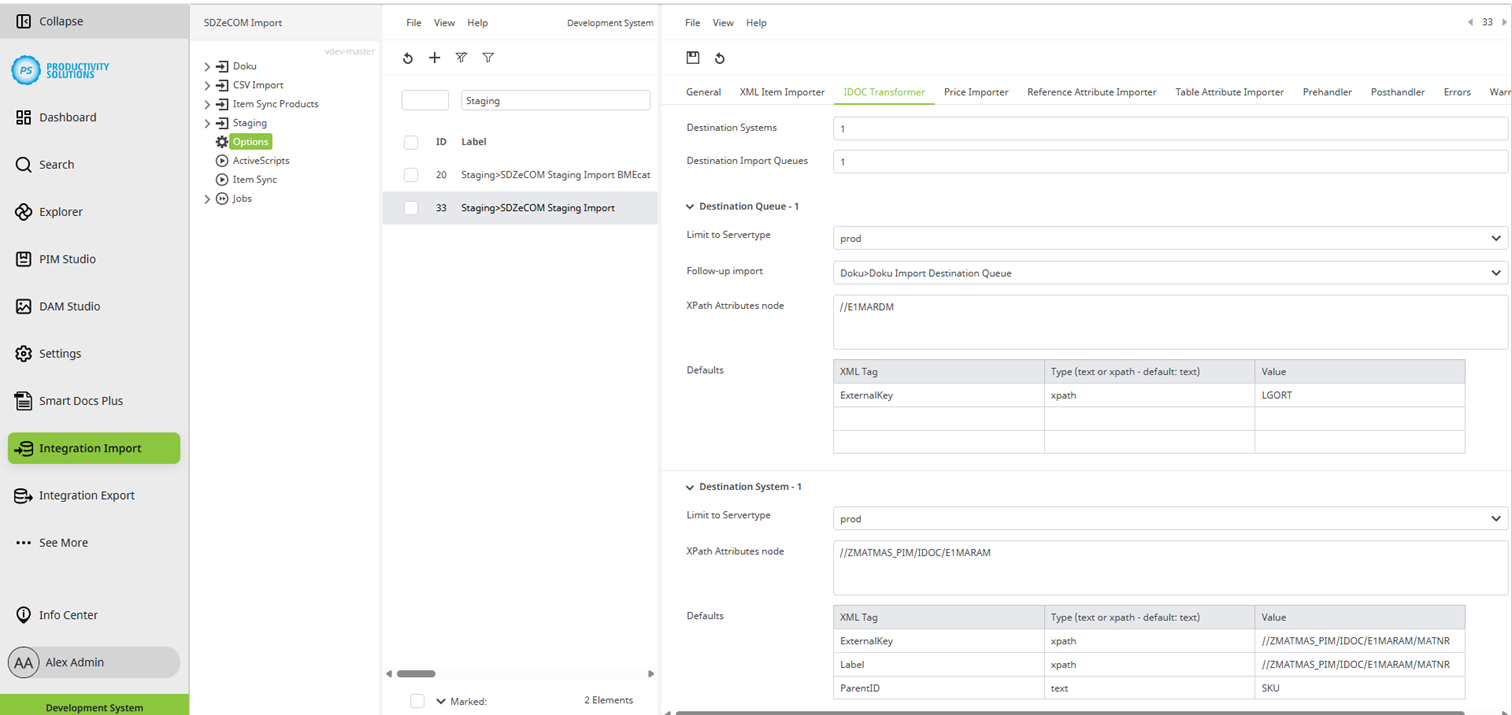
Field
|
Description
|
|
Destination Systems |
Enter the number of target systems required for this context. The fields described below are available per target system. |
|
Limit to Servertype |
Select the server type:
Use case: You import into a test target system and a productive target system. Create both systems as destination systems. Select the appropriate server type for each. The import context knows which system it is in: Only the respective environment is addressed from the corresponding source system. This ensures that no imports are made from a test system into the productive system when copying the system to the staging tenant. |
|
XPath Attributes node |
Define the node at which the attributes begin. Example: //ZES_MATMAS05_EXT/IDOC/E1MARAM |
|
Defaults |
Define at least the following XML tags (target fields in Centric PXM™):
To read a value from the IDOC, enter xpath as “Type”. For a fixed value enter text. Under “Value” you define the IDOC node that contains the information. 
|
Follow-up imports for references
Use follow-up imports with your own definitions for deviating transformations for individual segments of an IDOC, or if you want to divide the import in general.
Field
|
Description
|
|
Destination Import Queues |
Enter the number of follow-up imports required for this context. The fields described below are available per follow-up import. |
|
Follow-up import |
Select the context to be processed next. |
|
Limit to Servertype |
Select the server type:
Use case: You import into a test target system and a productive target system. Create both systems as destination systems. Select the appropriate server type for each. The import context knows which system it is in: Only the respective environment is addressed from the corresponding source system. This ensures that no imports are made from a test system into the productive system when copying the system to the staging tenant. |
|
XPath Attributes node |
Define the required. |
|
Defaults |
Define at least the following XML tags (target fields in Centric PXM™):
To read a value from the IDOC, enter xpath as “Type”. For a fixed value enter text. Under “Value” you define the IDOC node that contains the information.
|