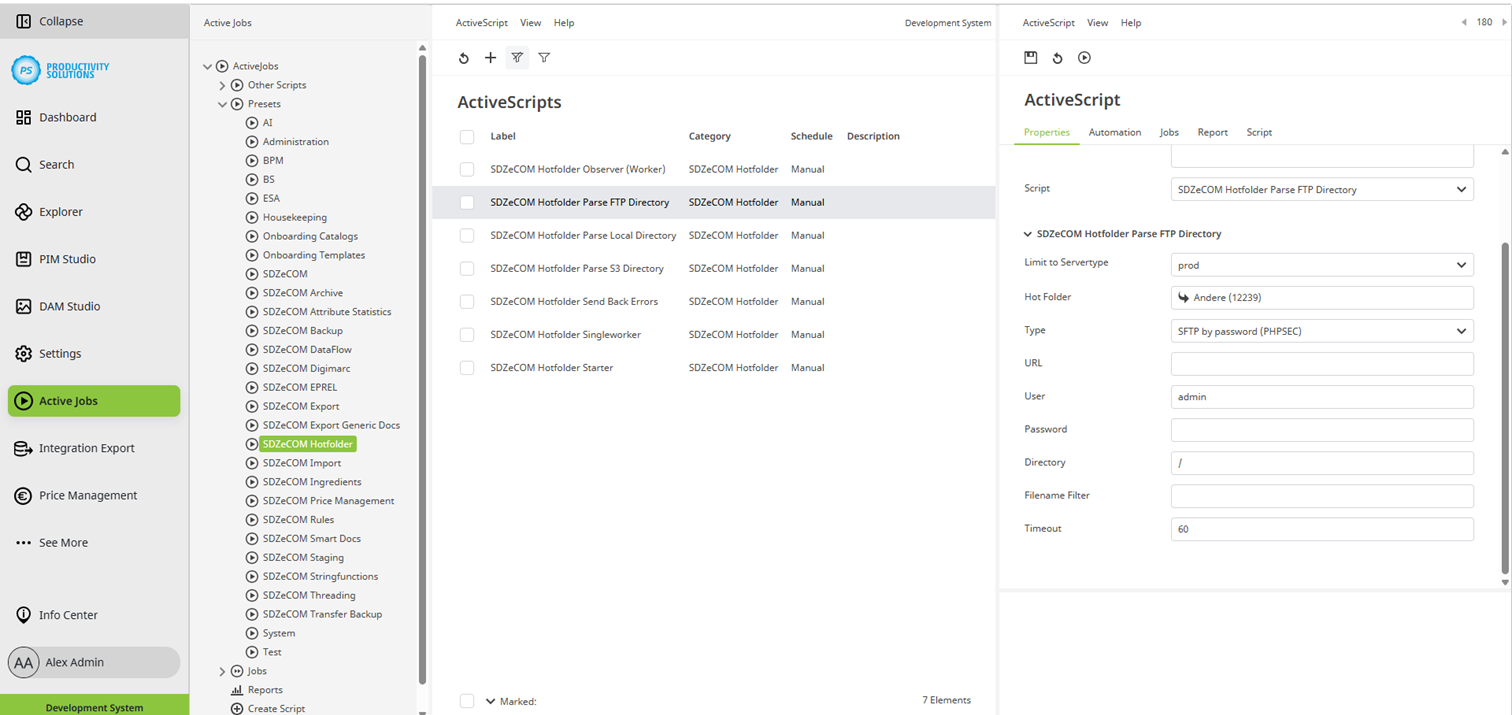
This script can be used for querying an FTP directory from which the data to be imported is to be retrieved.
Field
|
Description
|
|
Designation |
Name of the context |
|
Category |
SDZeCOM Hotfolder |
|
Description |
|
|
Script |
SDZeCOM Hotfolder Parse FTP Directory |
|
Limit to Servertype |
Select the server type:
Use case: You import into a test target system and a productive target system. Create both systems as destination systems. Select the appropriate server type for each. The import context knows which system it is in: Only the respective environment is addressed from the corresponding source system. This ensures that no imports are made from a test system into the productive system when copying the system to the staging tenant. |
|
Hotfolder |
Select the folder into which you want to import the data. |
|
Type |
Select the FTP type:
|
|
URL |
Enter the URL of the FTP server. |
|
Optional Port |
Optionally, you can define a port. |
|
User |
Enter the user name for the FTP server. |
|
Password |
Enter the password for the FTP server. |
|
Directory |
If required, enter a path to the source folder on the FTP server. |
|
Filename Filter |
If a filter is entered, only files that meet the filter criteria will be imported. Only one filter criterion is possible per context. Example filters:
|
|
Timeout |
If no connection can be established after the specified time in seconds, the import is aborted. Otherwise, the import waits and may block the system and other imports. Default: 60 |