
This posthandler sends text data to a text-to-image AI in Azure (Flux).
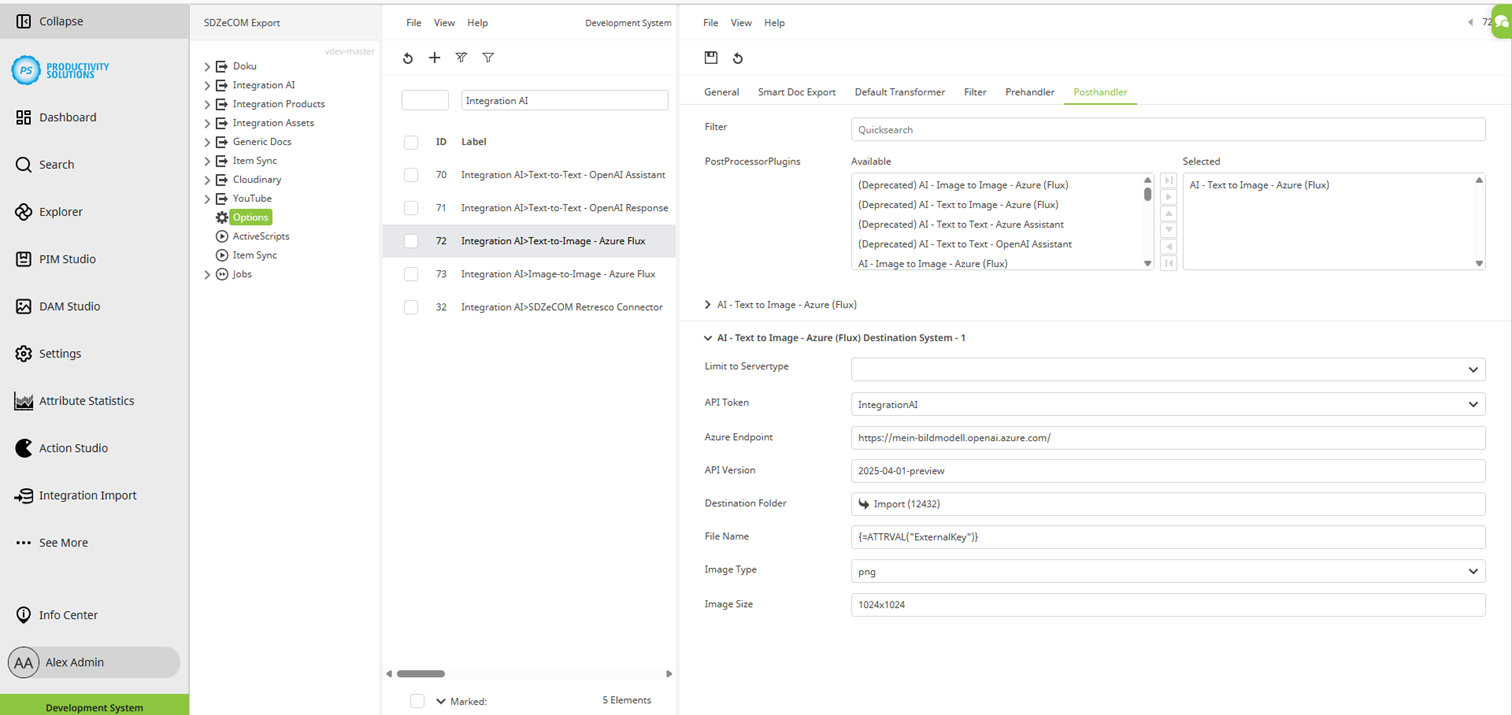
Field
|
Description
|
|---|---|
|
Destination Systems |
Enter the number of target systems required for this context. In this use case, a “1” is entered since the data is sent to only one destination. |
|
Limit to Servertype |
May be left empty |
|
API Token |
Create the token (module: SDZeCOM Integration) in the Credentials section under Settings > General, and then select it here. |
|
Azure Endpoint |
Enter the URL of the Azure OpenAI endpoint. |
|
API Version |
Enter the data that is displayed in Azure at the end of the URL with “api-version= ...”. Enter the content that appears after the = character. |
|
Destination Folder |
Select the DAM folder where you want to save the generated image. |
|
Dateiname |
If you require a specific format for the file name, you can also specify a function and/or static text here. Example: Fluximage_{=ATTRVAL(“ExternalKey”)}-{=DATE()} |
|
Image Type |
Choose between png und jpg. |
|
Image Size |
Specify the maximum size (width x height) of the image in pixels. Enter the value without spaces or suffixes. Example: 1024x1024 |