
This posthandler sends the assets to an Amazon S3 Simple Storage Service.
Available for:
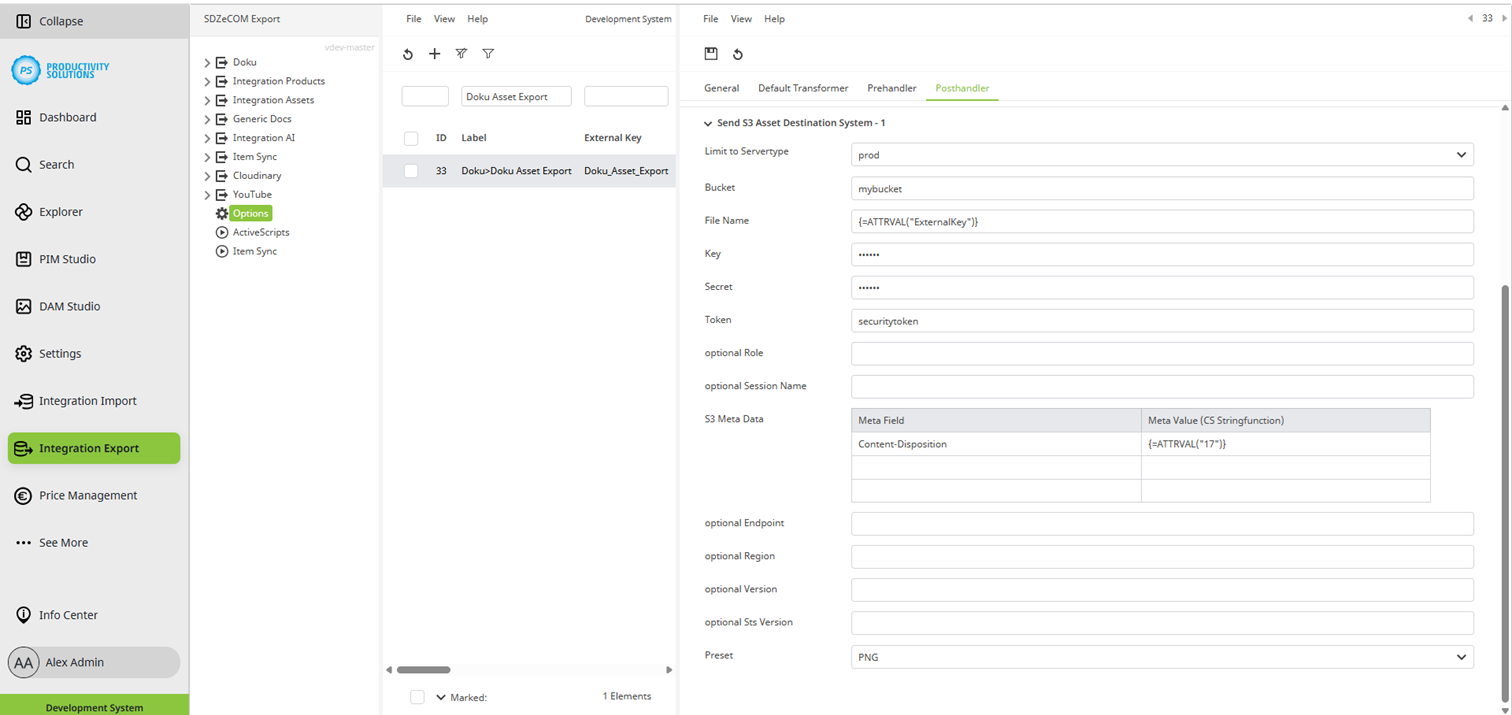
Field
|
Description
|
|
Destination Systems |
Enter the number of target systems required for this context. The fields described below are available per target system. |
|
Limit to Servertype |
Select the server type:
Use case: You export to a test target system and a productive target system. Create both systems as destination systems. Select the appropriate server type for each. The export context knows which system it is in: Only the corresponding target system is addressed from the respective environment. This ensures that no exports are made to a productive target system when copying the system to the staging tenant. |
|
Bucket |
Enter the S3 Bucket. |
|
File name |
Optionally, the file name can be a function. Example: {=ATTRVAL(“ExternalKey”)}.xml |
|
Key |
File name |
|
Secret |
Enter the S3 Secret. |
|
Token |
Create the password in the Credentials section under Settings > General, and then select it here. |
|
optional Role |
Optionally, you can define the role if the login is to take place with temporary data generated by AWS STS. |
|
optional Session Name |
Optionally, you can define the session if the login is to take place with temporary data generated by AWS STS. |
|
S3 Meta Data |
You can specify additional meta information as key pairs in the table. |
|
optional Endpoint |
Optionally, you can define a deviating endpoint. |
|
optional Region |
Optionally, you can define a deviating region. |
|
optional Version |
Optionally, you can define a deviating version. |
|
optional Sts Version |
Optionally, you can define a deviating STS client version. |
|
Preset |
Select the DAM preset to be used for rendering the assets. |