
This posthandler sends the objects in which a valuerange value is used to another queue, such as an export queue.
Background / Use case: When a valuerange entry is changed, the objects in which the entry is used do not detect that a change has occurred. However, the objects must be re-exported as a result of the change. By performing an “export” (XML Record Export without a destination) of the valuerange entries (CORE Services Values (Valuerangevalue)), this posthandler can be used for adding the objects in which the entry is used to the export queue.
Available for:
There are no plans to make this posthandler available for Action Queues since they do not support delta processing - i. e. processing only of changed entries.
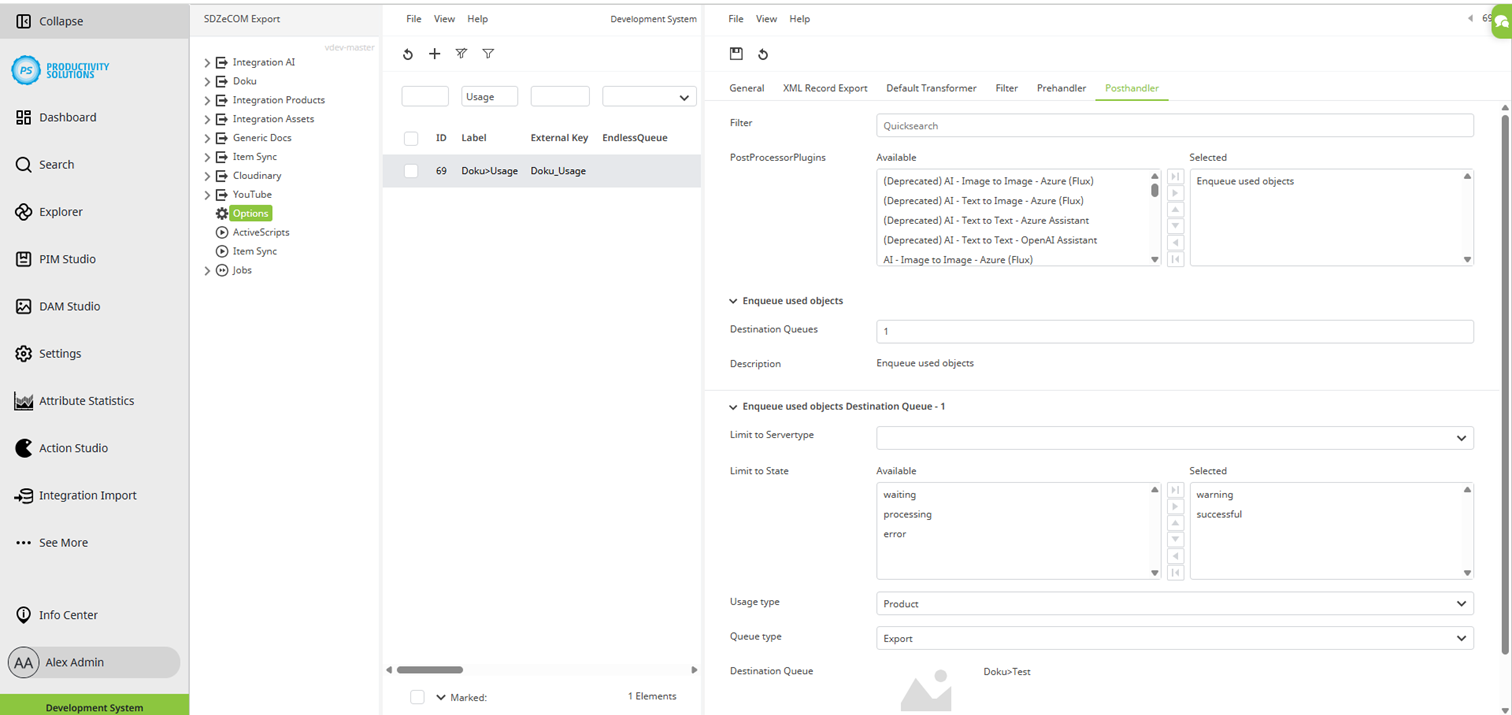
Field
|
Description
|
|
Destination Systems |
Enter the number of target systems required for this context. The fields described below are available per target system. |
|
Limit to Servertype |
Select the server type:
Use case: You export to a test target system and a productive target system. Create both systems as destination systems. Select the appropriate server type for each. The export context knows which system it is in: Only the corresponding target system is addressed from the respective environment. This ensures that no exports are made to a productive target system when copying the system to the staging tenant. |
|
Limit to State |
If necessary, define the processing status that an object must have in order to be placed in the destination queue (see below: Destination Queue). This allows you, for example, to fill different destination queues based on the processing status, and thus control what what to be done to the objects depending on the status. Default: successful, warning |
|
Usage Type |
Select the type of objects in which the value from the valuerange is used, such as products. These are then moved to the follow-up queue. |
|
Queue Type |
Select the type of the target queue:
|
|
Destination Queue |
Select the queue to which the objects that use the processed entry are to be sent. |