
The Rules+ module includes the "Write back result" function for each attribute.
This allows you to transfer the value of the attribute to another attribute. This process can only be carried out if a selected rule is fulfilled.
This function is recommended for formula attributes, for example. Save the result of the formula in a single-line text attribute, for example, to make the formula result searchable.
However, it cannot be used for table attributes.
Never write back in a selection attribute.
Caution: If you write back the result in a default attribute, this happens regardless of whether the object is in the PIM tree or in a channel! If this behavior is not desired, restrict the function to the corresponding area using an optional rule (see below).
As soon as you have activated the option on the attribute, you have the following additional setting possibilities:
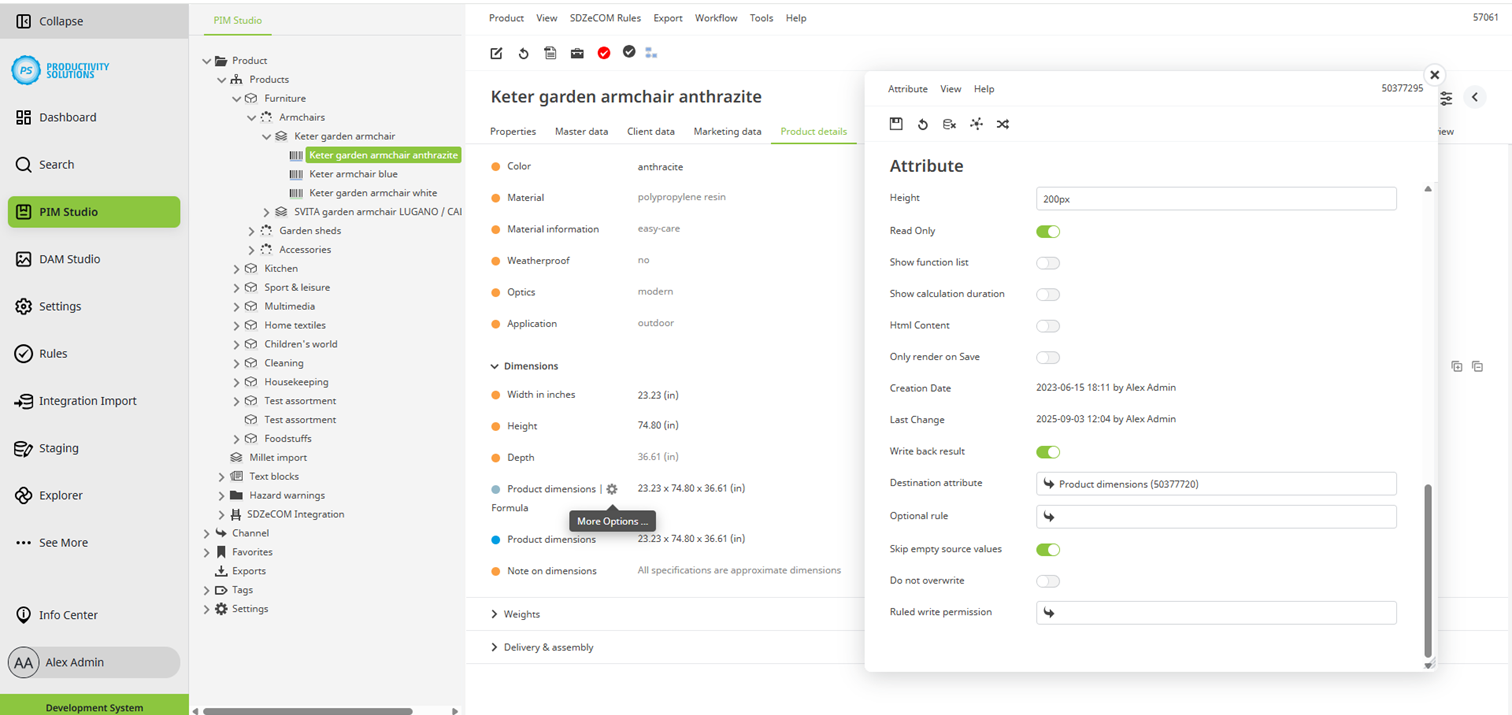
Field
|
Description
|
|---|---|
|
Optional rule |
If required, select a rule that must be fulfilled for the result to be written into the target attribute. |
|
Skip empty source values |
Activate this option to prevent the target attribute from being overwritten if the source attribute has no value. The attribute is also considered empty if a formula is stored and its result is empty. |
|
Do not overwrite |
Activate this option to prevent the target attribute from being overwritten if it already has a value. |