
With the Rules+ module, it is possible to validate formulas even if there is no formula attribute.
In addition, numbers can be validated as formula results (e.g., the result of the formula XYZ is “smaller than” 50). In such cases, if the formula attribute is used as the comparison field, “smaller than” simply checks the number of characters in the result.
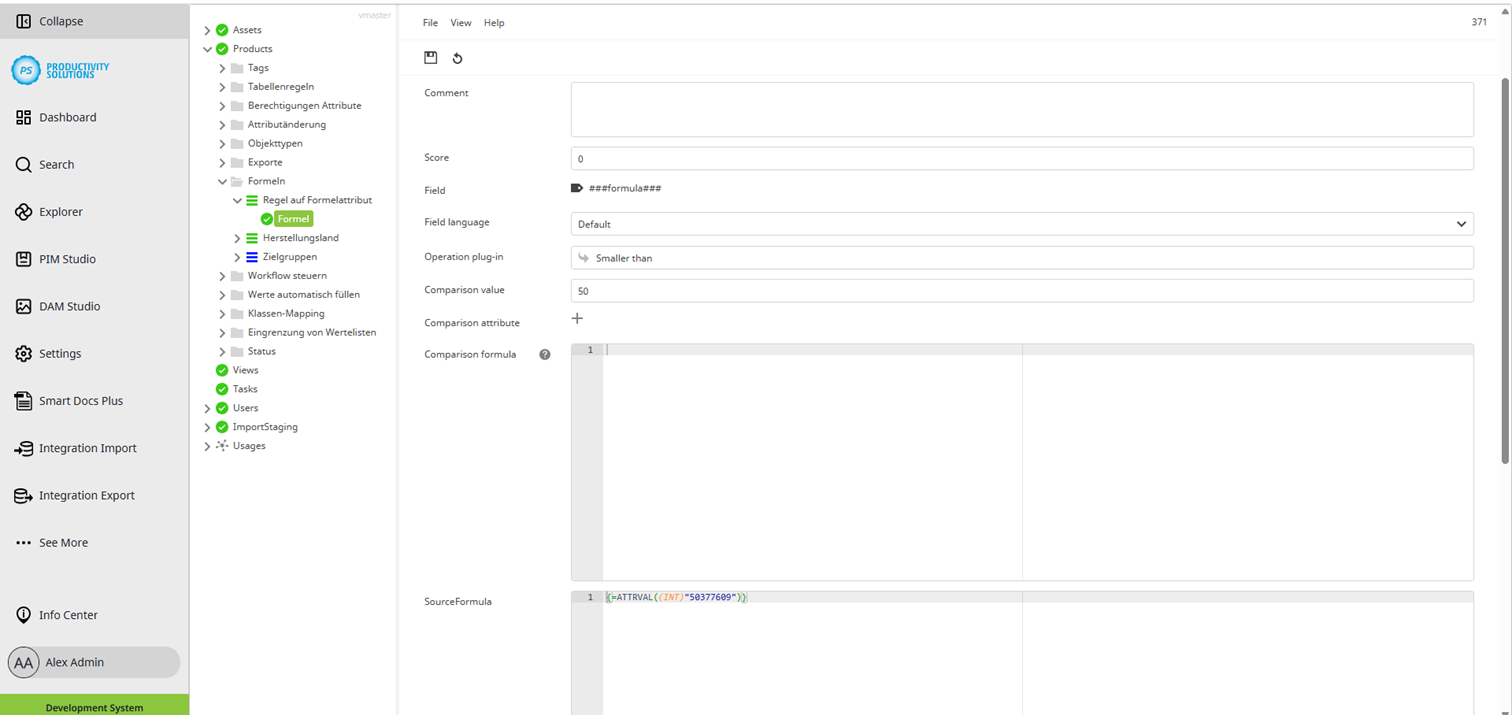
To check formulas, refer to the notes on “Field” and “SourceFormula”.
All other notes correspond to those of a default criterion.
Field
|
Description
|
|---|---|
|
Label |
Name of the criterion |
|
Deactivated |
Deactivates the criterion per checkbox A deactivated criterion is indicated by a red criterion symbol. |
|
Comment |
You can enter notes and other information. |
|
Weighting of the criterion within the rule scores The score is weighted later within the criteria. The values of the criteria and the overall rule are always added together! |
|
|
Feld |
Select ###formula### as field (the last item in the list of default attributes). |
|
Field language |
Data language in which the content is to be checked |
|
Field format |
Formatted or unformatted Examples:
|
|
Field inheritance |
Allows / prohibits whether inherited values are valid This can be used, for example, to prevent an inherited and untouched value that should have been adjusted from being incorrectly categorised as OK. |
|
Field subtype |
For multi-part attributes, e.g. number with selection field, determines which part of the attribute is to be checked. |
|
Check type |
|
|
Comparison value |
Value to be used for the comparison
|
|
Comparison attribute |
Attribute to be used for the comparison |
|
Comparison attribute |
Formula to be used for the comparison if a simple text or attribute value is not sufficient and may need to be expanded, formatted or edited beforehand. |
|
SourceFormula |
Enter the formula you want to check. |