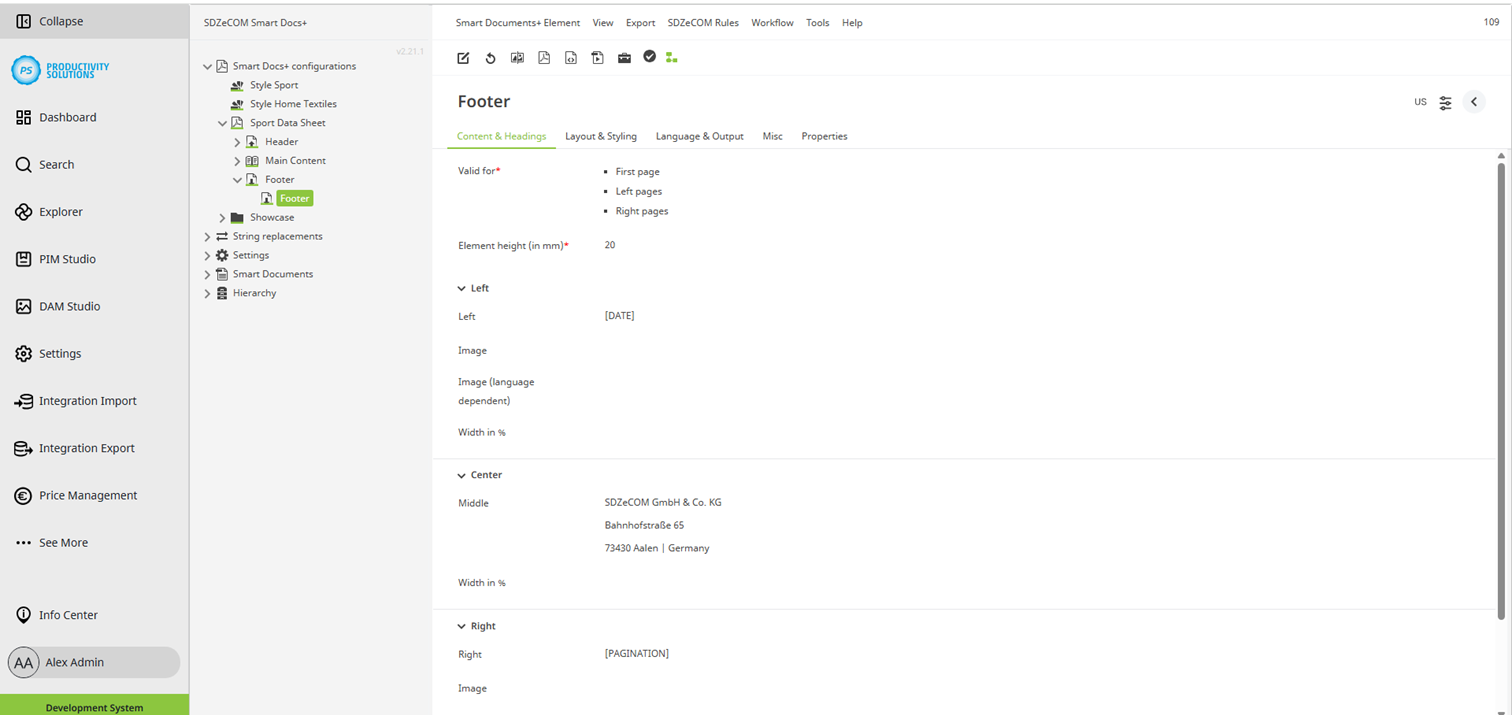
Configurable for the following object types:
There are a total of 3 options for the footer content.
Of the options provided, the first one is used in the following order:
Left
Field
|
Description
|
|---|---|
|
Left |
Left section of the footer Stringfunctions (formulas) are evaluated and can be used as required. Keywords:
|
|
Image |
If desired, select an image to be displayed in all languages. |
|
Image (language-dependent) |
If necessary, select an image to be displayed for each language level. |
|
Width in % |
Specify the width of the left section of the footer in %. Make sure that you distribute the percentages in the left, middle and right sections in such a way that they add up to 100 %. If the total is not 100 %, the left and, if necessary, the middle and right sections are shortened accordingly by the system. Unless a value is entered, the left, middle and right areas are distributed evenly. |
Middle
Field
|
Description
|
|---|---|
|
Middle |
Middle section of the footer Stringfunctions (formulas) are evaluated and can be used as required. Keywords:
|
|
Width in % |
Specify the width of the middle section of the footer in %. Make sure that you distribute the percentages in the left, middle and right sections in such a way that they add up to 100 %. If the total is not 100 %, the left and, if necessary, the middle and right sections are shortened accordingly by the system. Unless a value is entered, the left, middle and right areas are distributed evenly. |
Right
Field
|
Description
|
|---|---|
|
Right |
Right section of the footer Stringfunctions (formulas) are evaluated and can be used as required. Keywords:
|
|
Image |
If desired, select an image to be displayed in all languages. |
|
Image (language-dependent) |
If necessary, select an image to be displayed for each language level. |
|
Width in % |
Specify the width of the right section of the footer in %. Make sure that you distribute the percentages in the left, middle and right sections in such a way that they add up to 100 %. If the total is not 100 %, the left and, if necessary, the middle and right sections are shortened accordingly by the system. Unless a value is entered, the left, middle and right areas are distributed evenly. |